Best Free Portfolio Websites 2026: 8 Options Compared
Written by Boy Andrian · Updated (published )
Last updated:
The best free digital portfolio options in 2026 are PortfolioLink, Canva Websites, Wix, Notion, Carrd, Behance, Framer and Adobe Portfolio. PortfolioLink is fastest — a no-watermark link in about 60 seconds. Wix and Framer give the most design control, Behance offers discovery, and Adobe Portfolio requires a Creative Cloud plan.
Quick Summary
- Fastest and free with no watermark: PortfolioLink (about 60 seconds).
- Most design control: Wix and Framer — but free plans show their ads or badge.
- Free custom domains are rare: Wix, Canva, Framer and Carrd all need a paid plan.
A free portfolio website is an online page or site where you show your work, skills and contact details without paying for hosting or a builder. This guide compares the eight options people actually use in 2026 — setup time, free plan limits, watermarks, free URLs, custom domains and SEO control — with links to each platform’s official pricing.
The quick answer
If you want a professional portfolio live today, use PortfolioLink: it is free, has no watermark and takes about a minute. If you want to design every pixel, use Wix or Framer and accept their branding on the free plan.
Already have a polished deck? Canva Websites puts it online fastest. Visual artists who want an audience should add Behance, and Creative Cloud subscribers already have Adobe Portfolio included.
Comparison table: best free portfolio sites
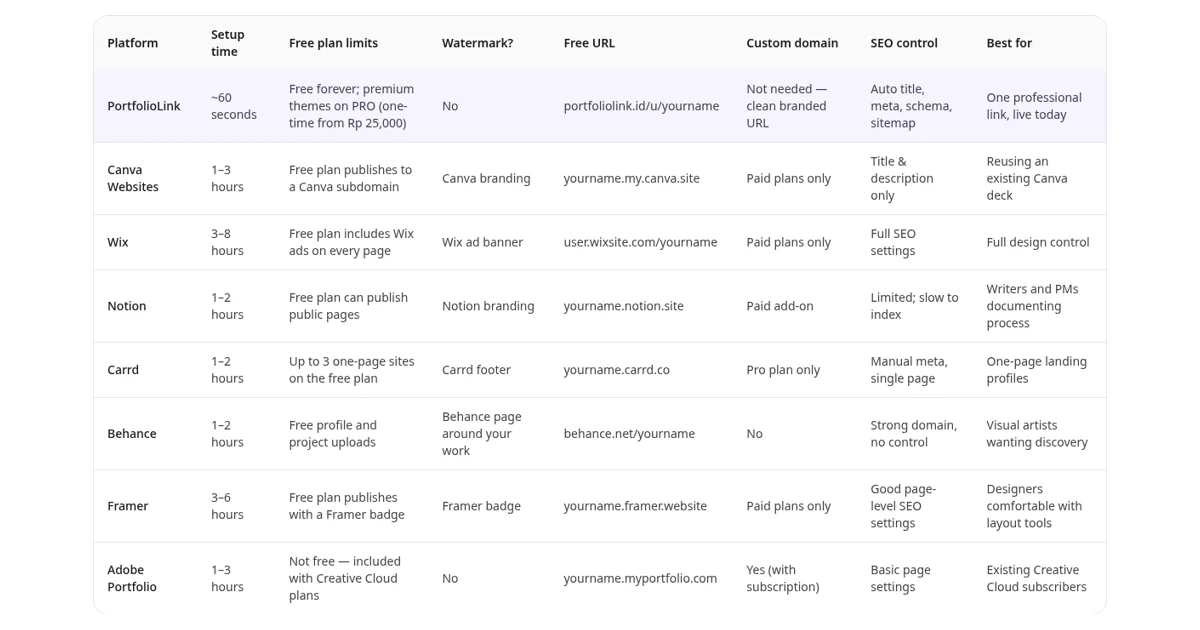
| Platform | Setup time | Free plan limits | Watermark? | Free URL | Custom domain | SEO control | Best for |
|---|---|---|---|---|---|---|---|
| PortfolioLink | ~60 seconds | Free forever; premium themes on PRO (one-time from Rp 25,000) | No | portfoliolink.id/u/yourname | Not needed — clean branded URL | Auto title, meta, schema, sitemap | One professional link, live today |
| Canva Websites | 1–3 hours | Free plan publishes to a Canva subdomain | Canva branding | yourname.my.canva.site | Paid plans only | Title & description only | Reusing an existing Canva deck |
| Wix | 3–8 hours | Free plan includes Wix ads on every page | Wix ad banner | user.wixsite.com/yourname | Paid plans only | Full SEO settings | Full design control |
| Notion | 1–2 hours | Free plan can publish public pages | Notion branding | yourname.notion.site | Paid add-on | Limited; slow to index | Writers and PMs documenting process |
| Carrd | 1–2 hours | Up to 3 one-page sites on the free plan | Carrd footer | yourname.carrd.co | Pro plan only | Manual meta, single page | One-page landing profiles |
| Behance | 1–2 hours | Free profile and project uploads | Behance page around your work | behance.net/yourname | No | Strong domain, no control | Visual artists wanting discovery |
| Framer | 3–6 hours | Free plan publishes with a Framer badge | Framer badge | yourname.framer.website | Paid plans only | Good page-level SEO settings | Designers comfortable with layout tools |
| Adobe Portfolio | 1–3 hours | Not free — included with Creative Cloud plans | No | yourname.myportfolio.com | Yes (with subscription) | Basic page settings | Existing Creative Cloud subscribers |
Platform names link to each official pricing page. Setup times are our estimates for a first presentable version. Free tiers change often, so double-check before committing.
Which free portfolio website should you use? (short list)
If you want one link, live today → PortfolioLink
About 60 seconds from sign-up to a shareable, no-watermark link.
If you already have a Canva deck → Canva Websites
Publish your existing design to the web without rebuilding it.
If you want full design control → Wix
Drag-and-drop freedom, blogs and forms — plan for an afternoon or more.
If you live in Notion → Notion
Turn a workspace page into a public portfolio in minutes.
If you code or love layout tools → Framer / Carrd
Framer for animated multi-page sites, Carrd for a lean one-pager.
If you only need a gallery → Behance / Adobe Portfolio
Behance for discovery, Adobe Portfolio if you already pay for Creative Cloud.
Full reviews
1. PortfolioLink — fastest path to one professional link
PortfolioLink skips the page-builder step. You fill in sections — about, experience, skills, featured work, services, contact — and layout, typography and mobile behaviour are handled for you. The result is one link you can drop into a proposal, CV or Instagram bio. Price: free forever; PRO is a one-time payment from Rp 25,000 (see pricing).
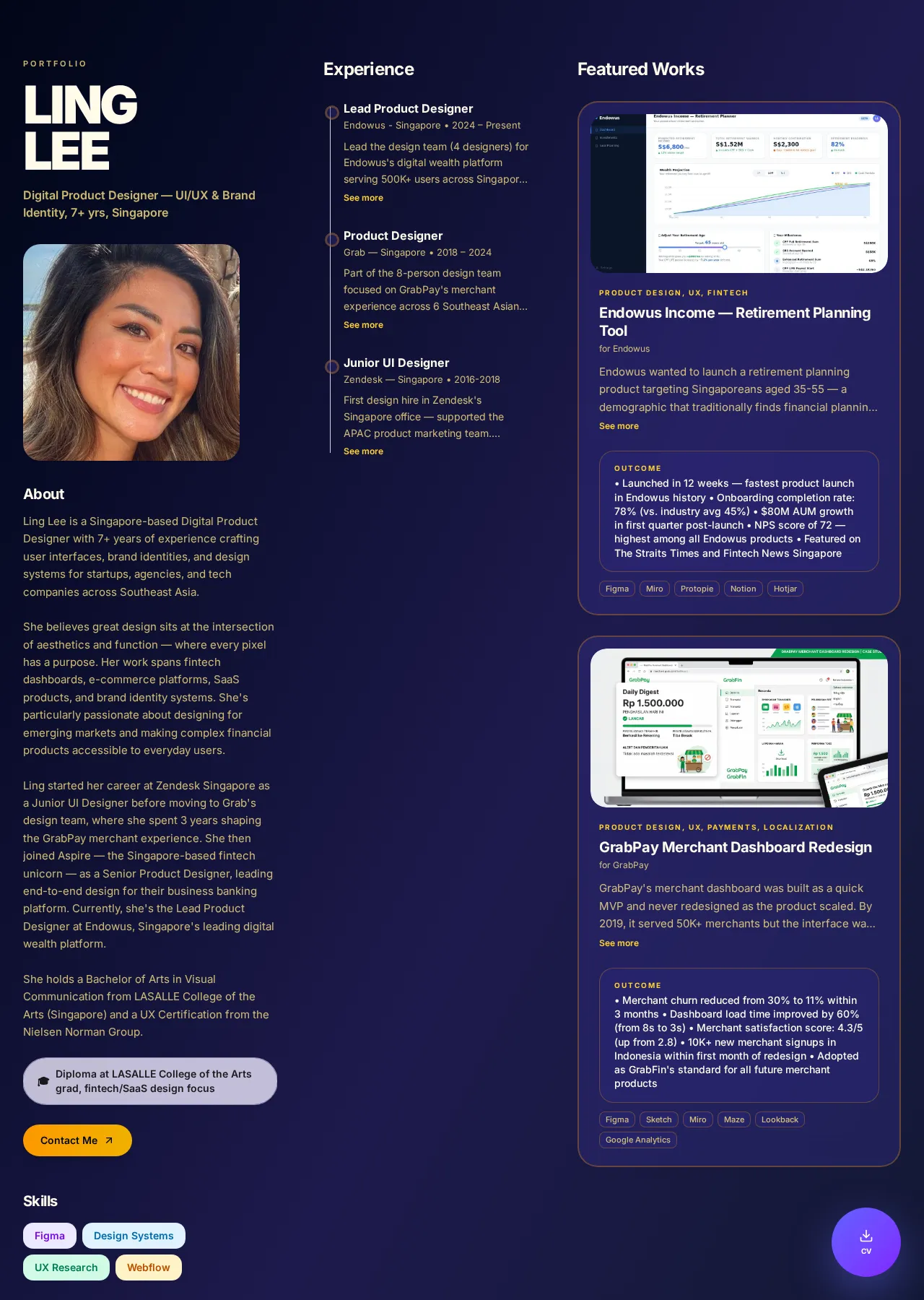
- ✅ Live in roughly 60 seconds, no coding and no template hunting
- ✅ No watermark on the free plan
- ✅ Individual and company portfolio modes
- ✅ Meta tags, Person/Organization schema and sitemap generated automatically
- ❌ Less pixel-level layout freedom than a full site builder
Free plan reality: Free forever; premium themes on PRO (one-time from Rp 25,000). Free URL: portfoliolink.id/u/yourname. Custom domain: Not needed — clean branded URL.
Source: PortfolioLink official pricing (checked October 2026).
2. Canva Websites — great decks, average websites
Canva publishes your design straight to a Canva subdomain. Useful when you already have a deck, but a Canva site is still a document and the free plan keeps Canva’s branding.
- ✅ Reuses designs you already made
- ✅ Huge template library
- ❌ Layouts scale rather than reflow on phones
- ❌ SEO stops at title and description
Free plan reality: Free plan publishes to a Canva subdomain. Free URL: yourname.my.canva.site. Custom domain: Paid plans only.
Source: Canva Websites official pricing (checked October 2026).
3. Wix — maximum control, maximum time
Wix is a strong choice when the website itself is part of your portfolio and you enjoy designing.
- ✅ Real drag-and-drop design freedom
- ✅ Blogs, forms and stores built in
- ❌ Wix ad banner on every free page
- ❌ Several hours before it looks presentable
Free plan reality: Free plan includes Wix ads on every page. Free URL: user.wixsite.com/yourname. Custom domain: Paid plans only.
Source: Wix official pricing (checked October 2026).
4. Notion — fast for process-heavy work
Product managers, writers and researchers can document their process without any design work.
- ✅ Publish an existing page in minutes
- ✅ Great for long-form case studies
- ❌ Public pages are slow for crawlers and rarely rank
- ❌ Looks like a document, not a portfolio
Free plan reality: Free plan can publish public pages. Free URL: yourname.notion.site. Custom domain: Paid add-on.
Source: Notion official pricing (checked October 2026).
5. Carrd — the cleanest one-pager
Carrd is ideal for a landing-style profile, but a portfolio with several case studies outgrows it.
- ✅ Very lightweight and fast
- ✅ Simple editor
- ❌ One page per site
- ❌ Custom domain needs Pro
Free plan reality: Up to 3 one-page sites on the free plan. Free URL: yourname.carrd.co. Custom domain: Pro plan only.
Source: Carrd official pricing (checked October 2026).
6. Behance — built-in creative audience
Behance is best as a second channel for visual artists, not as your only professional link.
- ✅ Strong domain authority
- ✅ Discovery inside Adobe's community
- ❌ Competitor work recommended next to yours
- ❌ Almost no control over presentation
Free plan reality: Free profile and project uploads. Free URL: behance.net/yourname. Custom domain: No.
Source: Behance official pricing (checked October 2026).
7. Framer — designer-grade sites
Framer suits designers comfortable with Figma-style tools who want a site that stands out.
- ✅ Beautiful animations and layouts
- ✅ Good page-level SEO settings
- ❌ Framer badge on the free plan
- ❌ Steeper learning curve
Free plan reality: Free plan publishes with a Framer badge. Free URL: yourname.framer.website. Custom domain: Paid plans only.
Source: Framer official pricing (checked October 2026).
8. Adobe Portfolio — included, not free
If you already pay for Creative Cloud, Adobe Portfolio is a solid gallery at no extra cost.
- ✅ No ads, clean galleries
- ✅ Syncs with Behance projects
- ❌ Requires a paid Creative Cloud plan
- ❌ Limited layout options
Free plan reality: Not free — included with Creative Cloud plans. Free URL: yourname.myportfolio.com. Custom domain: Yes (with subscription).
Source: Adobe Portfolio official pricing (checked October 2026).
How to choose in two minutes
- Deadline today? Pick the shortest setup time — a live link beats a perfect draft.
- Sending it to clients or recruiters? Avoid free plans that stamp their branding on your work.
- Want to be found on Google? Make sure you can edit the title and description and that a sitemap exists. See our SEO guide for portfolio websites.
- Need your own domain? Budget for a paid plan — free custom domains are almost non-existent.
- Selling services? Add a clear contact CTA — see turning a portfolio into a sales funnel.
Prefer a no-code walkthrough in Indonesian? Read platform portofolio tanpa coding.
Which is best for you?
For freelancers
PortfolioLink for one client-ready link; add Behance if you are a visual creative.
For students and fresh graduates
PortfolioLink — free, no design skills needed, one link for your CV. Notion works for class project write-ups.
For designers
Framer or Wix for full control, Behance for discovery, Adobe Portfolio if you have Creative Cloud.
For developers
Carrd or Framer for a lean personal site, or PortfolioLink linking out to GitHub.
For agencies and small businesses
PortfolioLink’s company mode for services and case studies, or Wix for a full multi-page site.
Frequently asked questions
What are the best free digital portfolio options in 2026?
The best free digital portfolio options in 2026 are PortfolioLink, Canva Websites, Wix, Notion, Carrd, Behance and Framer. PortfolioLink is fastest (about 60 seconds, no watermark), Wix and Framer give the most design control, and Behance offers community discovery. Adobe Portfolio is strong but needs a Creative Cloud subscription.
What is the best free portfolio website for freelancers?
For freelancers, PortfolioLink is the quickest free option: a live, no-watermark portfolio link in about 60 seconds that fits proposals and bios. Wix suits freelancers who want full design control and have several hours, while Behance works for visual artists who want discovery inside a creative community.
What is the best free portfolio website for students?
For students and fresh graduates, PortfolioLink is usually best because it is free, needs no design skills and produces one clean link for CVs and job applications. Notion works for documenting class projects, and Behance suits art and design students who want their work seen by a creative audience.
Is Canva good for a portfolio website?
Canva is good for designing a portfolio deck or PDF, and Canva Websites can publish a simple page. However, free sites use a Canva subdomain, layouts scale rather than reflow on phones, and SEO control stops at title and description. Use it as a supporting asset rather than your main portfolio URL.
Do free portfolio sites add watermarks or ads?
Many do. Wix free plans show a Wix ad banner, Framer adds a badge, Carrd adds a footer, and Canva and Notion keep their branding and subdomains. PortfolioLink publishes free portfolios without a watermark, so clients and recruiters only see your work. Always check the official pricing page before choosing.
Which free portfolio site lets me use my own domain?
Almost no platform connects a custom domain on a free plan. Wix, Canva, Framer and Carrd require a paid plan, Notion sells it as an add-on, and Adobe Portfolio includes it with Creative Cloud. PortfolioLink gives you a clean branded URL, portfoliolink.id/u/yourname, so a custom domain is optional.
Can a free portfolio rank on Google?
Yes, a free portfolio can rank on Google if the platform gives you a clean URL, an editable title and meta description, structured data and a sitemap. Pages hidden behind heavy builders or PDF exports rarely rank. Putting your name, profession and city in the page title is usually the fastest win.
Is PortfolioLink really free, and what does the paid plan add?
Yes, PortfolioLink is free forever: you can publish a complete portfolio with no watermark and no time limit. The PRO upgrade is a one-time payment starting at Rp 25,000, with no monthly subscription, and adds premium themes and extra customisation. You can start free and upgrade only if you need it.
Ready to stop comparing and start shipping?
Build your portfolio in about a minute — no watermark, no template hunting, one link you can send to any client. Upgrade later only if you want the premium themes.